

When it does not work
Almost every message in this guide names the wrong thing. That is not carelessness — it is what a layered system says when a component it depends on goes quiet. The installer says the appliance is unreachable when the appliance is fine and busy waiting on OpenAI. The console says the server is starting when the server has been up for an hour. A pull fails with a credentials error before it ever contacts a registry.
So this guide is keyed on the sentence you actually see, and each entry says what the message proves, what it does not, and the one command that separates them.
Start here, always
Section titled “Start here, always”embabel doctorEvery line in it is a real failure somebody hit, with the fix attached. It checks the host: Docker, compose, credential helpers, the Model Runner, the embedding model, your realm checkouts, and how much room Docker has. It does not check a running appliance — for that, keep reading.
Which appliance
Section titled “Which appliance”A machine can run more than one appliance, so the commands below name containers
through $P, the appliance’s compose project. Set it first:
P=embabel-appliance # the default; another instance is embabel-<name>Containers are then $P-<service>-1. Run compose as embabel --instance <name> compose … rather than bare docker compose, which acts on the default appliance and
starts containers without their memory limits. embabel instances lists what is installed;
embabel --instance <name> doctor, status and logs pick one for you, and
EMBABEL_INSTANCE=<name> sh doctor.sh does the same for the script below.
If there is no embabel command yet
Section titled “If there is no embabel command yet”The install never got far enough to leave one. Nothing here needs it:
curl -fsSL https://raw.githubusercontent.com/embabel-worlds/appliance/main/doctor.sh | shThat checks the same machine from the outside — Docker, the credential helper, memory and disk, every Embabel container and whether it is actually staying up, both doors, and the recent errors — and ends with a numbered list of what to fix, in order. It reads only. It starts nothing, deletes nothing, and prints no password, key or token, so the output is safe to paste into an issue.
If you already have the checkout, sh doctor.sh inside it does the same thing.
Working with a coding agent instead
Section titled “Working with a coding agent instead”If you have Claude Code or a similar agent, skills/appliance-doctor teaches it to do all
of this for you and explain the result in plain words. It assumes the appliance’s own tools
are unavailable, because if they worked you would not be reading this — and it can be
fetched without a checkout, since the install that would have made one is what failed:
mkdir -p ~/.claude/skills/appliance-doctor && curl -fsSL \ https://raw.githubusercontent.com/embabel-worlds/appliance/main/skills/appliance-doctor/SKILL.md \ -o ~/.claude/skills/appliance-doctor/SKILL.mdThen ask your agent to work out why Embabel will not start.
The two logs, and why this matters more than anything else here
Section titled “The two logs, and why this matters more than anything else here”docker logs shows you a filtered view. Under the appliance profile the console
appender passes operator-relevant lines and warnings, and routes known-harmless
framework noise to file only. The full log holds two to six times more, depending on how
busy the appliance has been — measured on one machine as 160 lines against 1041 shortly
after boot, and 1434 against 2866 after a working session.
The full log lives inside the container:
# the filtered operator viewdocker logs --tail 80 $P-worlds-1
# everythingdocker exec $P-worlds-1 tail -100 logs/assistant.log
/app/logs is not on a volume. It survives a restart; it does not survive the
container being recreated. If something is crash-looping and you want the log from a
previous boot, take a copy first — this works on a stopped container too:
docker cp $P-worlds-1:/app/logs/assistant.log ./assistant.logerror getting credentials — docker-credential-desktop: executable file not found
Section titled “error getting credentials — docker-credential-desktop: executable file not found”What it means. Nothing was pulled, and no registry was contacted. Your
~/.docker/config.json names a credential helper — "credsStore": "desktop" is what
Docker Desktop writes — and the Docker CLI runs that binary for every registry,
including anonymous pulls of public images. The binary is not on your PATH.
The appliance’s images are public and need no credentials at all, so this failure is pure configuration.
Fix, without admin rights:
export PATH="$PATH:/Applications/Docker.app/Contents/Resources/bin"Add that to your shell profile so it survives a new terminal. Or delete the
"credsStore" line from ~/.docker/config.json — with the trade that you will need to
docker login again for private registries, and those credentials will then sit in that
file rather than in your keychain.
embabel doctor reports this one before you get as far as a pull.
The appliance did not answer within 180s, because it is still waiting for OpenAI
Section titled “The appliance did not answer within 180s, because it is still waiting for OpenAI”What it means. Exactly what it says, and the appliance is not the problem. When you give it a provider key, the server validates it by making a real call to the provider with the provider’s own client — not a model list, because a key that can list models can still fail the first real request. If that call never comes back, this is what it looks like from the installer.
A network that drops traffic rather than refusing it produces precisely this. A proxy, a corporate firewall, a VPN.
Prove it, from inside the container, because that is where the blocked egress is:
docker exec $P-worlds-1 sh -c \ 'curl -s -o /dev/null -w "%{http_code} in %{time_total}s\n" --max-time 20 https://api.openai.com/v1/models'A healthy machine answers 401 in 0.18s — 401 is correct, it means reachable and
unauthenticated. A hang, or 000, means blocked, and no key will get through until that
does.
The way out is to skip the provider step (press Enter), finish the install, and put
the key in secrets.env beside the compose files afterwards. The container reads it
directly and never goes through the wizard’s validation.
Could not reach the appliance … (RemoteDisconnected) at “Finishing…”
Section titled “Could not reach the appliance … (RemoteDisconnected) at “Finishing…””Your install almost certainly succeeded. Completing setup restarts the appliance so the model beans are rebuilt with your provider key, and the server persists completion before it schedules that restart. On older installers, losing the race between the response and the restart ended the run with this message.
Current versions ride the restart out and verify. If you see it on an older one:
docker logs $P-worlds-1 2>&1 | grep "Setup complete — restarting"embabel upThe first line is the server logging its own restart on the way out. embabel up will
say “This appliance is already set up” and give you the address — that is the closing
block you did not get. Your MCP token and coding-agent wiring are intact; they are
established before the finish.
The console sits on “Connecting to Worlds” or “The Worlds server is still starting”
Section titled “The console sits on “Connecting to Worlds” or “The Worlds server is still starting””The console polls /api/v1/realms every two seconds and leaves that screen as soon as it
gets any real status back — including a 401, which is the normal answer before you
sign in. Staying there means the request is coming back as a connection failure or not at
all.
There is no proxy in the way to be the problem. The server serves the console itself, so
the console’s origin and the API’s are the same thing, and what your browser does is what
curl does:
# the console's own address, and the call it is waiting oncurl -s -o /dev/null -w "%{http_code} in %{time_total}s\n" --max-time 60 http://localhost:11044/api/v1/realms
# the same server on its other port, to tell a port-mapping problem from a server onecurl -s -o /dev/null -w "%{http_code}\n" --max-time 60 http://localhost:11043/api/v1/realms
# what the server itself says it diddocker logs --tail 30 $P-worlds-1
A working appliance answers 401 in 0.004s on the first two. Then:
| What you see | Meaning |
|---|---|
| 401 on both | the server is answering correctly — the problem is in the browser; hard-refresh or use a private window |
| nothing on 11044, 401 on 11043 | the port mapping, not the server: embabel compose ps and compare with .env |
| nothing on either | the server is not up or not finished starting — embabel status, then the logs above |
404 on http://localhost:11044/ui/ |
the server is up and has no console to serve. Almost always an image older than the console itself: the files travel inside the server image, and :latest only carries them from the first release that followed. embabel version names the tag; take a newer one, or EMBABEL_VERSION=edge in .env to track main. Not a port or proxy problem — the 401s above already proved the port reaches the server |
Bearer token resolved to user 'x' but the user could not be loaded
Section titled “Bearer token resolved to user 'x' but the user could not be loaded”What it means. An MCP client is connecting with a token that names a user the appliance cannot load. Two causes, deliberately indistinguishable to the caller so that an unauthenticated client cannot probe which usernames exist: the user is not there, or the user is there with no stored credential.
Repeated warnings are almost always a coding agent retrying on a schedule. It is a symptom, not a cause.
The usual reason is a token left over from an earlier install attempt naming an account
that was later recreated under a different name. The data volume survives a plain
reinstall; only embabel uninstall or --fresh clears it.
docker exec $P-worlds-1 sh -c 'echo "token names:"; grep -o "EMBABEL_SETUP_MCP_TOKEN_USER=.*" /data/embabel/assistant/admin/providers.envecho "credentials hold:"; sed -nE "/^credentials:/,/^[a-zA-Z]/p" /data/embabel/assistant/admin/.credentials.yml | sed -E "s/^( +)([A-Za-z0-9_.-]+): .*/\1\2/"'The two names must match. If they do not, re-run embabel up to mint a token for the
account that actually exists, or embabel agents to re-point your coding agents.
Neo4j connection failures in the log
Section titled “Neo4j connection failures in the log”On a Neo4j appliance. On the Embabel engine there is no Neo4j to connect to, and a line
like these means the server was started without its engine overlay — check that .env
says GRAPH_TYPE=EMBABEL and start it through embabel up, not a bare docker compose.
These are never routine. A healthy appliance logs nothing about Neo4j even when Neo4j is restarted underneath it — the driver reconnects lazily and silently. Verified by bouncing it under a live appliance: zero lines, and every surface kept answering.
So take them seriously, and start with when:
docker exec $P-worlds-1 sh -c 'grep -nE "7687|Neo4j|ServiceUnavailable" logs/assistant.log | tail -5'docker inspect -f 'worlds started {{.State.StartedAt}}' $P-worlds-1Lines older than that start are from a previous life of the process and are spent. Lines newer than it are live.
The hostname matters more than the port. neo4j:7687 is correct — that is the
container-to-container address. localhost:7687 is not, and would mean the container was
not created from these compose files. (The port a browser on your machine would use is
11046, and the app never uses it.)
If the address is right, look at Neo4j itself:
docker inspect -f 'health={{.State.Health.Status}} restarts={{.RestartCount}} OOM={{.State.OOMKilled}}' $P-neo4j-1docker logs --tail 60 $P-neo4j-1docker info --format '{{.MemTotal}}'OOMKilled is usually false even when memory is the cause, so do not read it as the
verdict. Neo4j checks its own configuration before it starts and refuses outright rather
than being killed:
ERROR Invalid memory configuration - exceeds physical memory. Check the configuredvalues for server.memory.pagecache.size and server.memory.heap.max_sizeNeo4j Server shutdown initiated by requestThe container then crash-loops with a climbing RestartCount, an exit code of 0, and
OOMKilled=false. restarts= is the tell, not the OOM flag.
The fix is tested, not hopeful. Neo4j runs a 2 GB heap by default plus the graph data
science plugin; in a 2 GB container it produced the error above six times in a row, and
with NEO4J_HEAP=1G in .env the same container came up healthy on the first try and
settled at 812 MiB. So either raise Docker’s memory, or lower the heap:
echo 'NEO4J_HEAP=1G' >> .env && embabel up“Get the better model” says Docker Model Runner is not turned on
Section titled ““Get the better model” says Docker Model Runner is not turned on”The better local embedding model is downloaded and served by Docker Model Runner. It is a Docker feature that stays off until somebody turns it on, and with it off the appliance has nothing to download the model with. An older appliance says this less clearly: the download starts, then ends with “The download did not finish”.
Turn it on:
-
Docker Desktop 4.40 or newer — Settings → AI → Enable Docker Model Runner, or:
Terminal window docker desktop enable model-runner -
Docker Engine on Linux — install the
docker-model-pluginpackage from Docker’s repository.
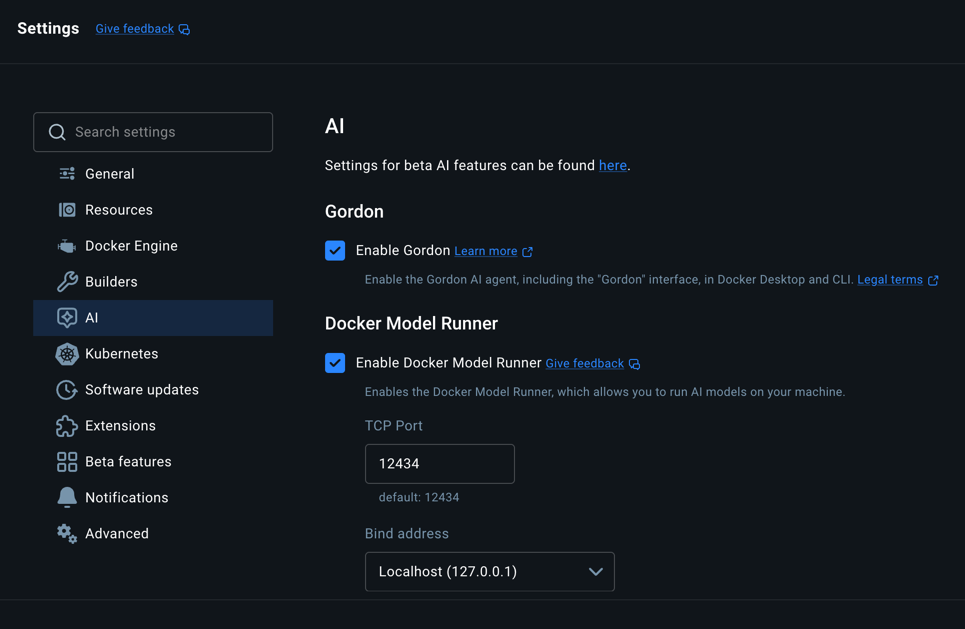
Docker moves this setting between releases. If it is not where the picture shows it, the command above still works.
Check that it answers, then go back to Models → Embeddings, press Check again, and press Get the better model:
docker model statusdocker pull is the wrong command for a model, and its error says nothing about
this. A model is not an image, so the Engine refuses it whether or not Model Runner is
on:
WARNING: AI models are not supported by the Engine yet, did you mean to use "docker model pull/run" instead?failed to unpack image on snapshotter overlayfs: mismatched image rootfs and manifest layersTo fetch the model by hand, ask Model Runner:
docker model pull ai/qwen3-embedding:0.6B-F16Things that look like evidence and are not
Section titled “Things that look like evidence and are not”This list cost real hours. Every one of them is a true observation that does not support the conclusion it appears to.
A fast 401 from /api/v1/realms proves the HTTP surface is up and nothing else.
The security filter rejects before anything touches the graph, so a 401 in four
milliseconds is entirely consistent with an unreachable database.
curl localhost:11043 working says the host can reach the worlds container. It says
nothing about whether the console container can, and those are the failures that strand
you on a loading screen.
A clean docker logs is not a clean log. It is a filtered view — see the top of this
page.
A port that “looks wrong” usually is not. Inside the Docker network the appliance uses container ports (Neo4j on 7687); on your machine it publishes different ones (bolt on 11046). Both are correct from their own side.
“It only started after I entered the API key” rarely means the key is bad. The key is what causes the restart, and the validation, and the model registration — three new things to fail, none of them about the key’s validity.
What it needs, measured
Section titled “What it needs, measured”Numbers off a working appliance, not a specification — embabel doctor prints your own
alongside them.
| memory, core running | ~4.6 GB on Neo4j (worlds 2.47, neo4j 2.09, console 0.01); not yet measured on the Embabel engine, where the graph is in the worlds container |
| disk, core | ~2.9 GB of images plus ~1.1 GB for the embedding model |
| disk, everything | ~14 GB — docling alone is 7.2 GB and arrives in the background |
The number that decides is what Docker has, not what the machine has. On macOS and
Windows the appliance lives in Docker’s VM and can never exceed its allocation, so a
32 GB laptop with Docker set to 2 GB runs out and an 8 GB one set to 6 GB is fine.
docker info --format '{{.MemTotal}}' is the honest figure; Docker Desktop →
Settings → Resources is where it changes.
Tested at the boundary: with the core squeezed into 4 GB, Neo4j refuses to start at its
default 2 GB heap and NEO4J_HEAP=1G fixes it, while the appliance JVM in 1.8 GB
restarts repeatedly and takes the console’s /api calls down to 502 with it. So 4 GB is
genuinely too little, and the first thing to give room to is the appliance rather than
the graph.
Each container has its own memory limit. embabel up splits Docker’s memory between
the app, the graph and docling, and embabel doctor prints the split — on a 7.65 GB
Docker VM, app 2.1 GB, graph 2.2 GB, docling 2.8 GB with one docling worker. Prometheus and
Grafana are off unless EMBABEL_MONITORING=on, and only then is memory held back for them. Before this, every
service sized itself against the whole VM: during a large ingest the VM ran out, the kernel
killed the app with nothing in its log, and the console showed 502 until it rebooted. With
limits, a spike stays in the service that caused it. A large PDF can now fail conversion
when docling hits its limit, and Docker records OOMKilled=true against docling. To give
one service more, set its limit in .env (DOCLING_MEM_LIMIT=4g) and run embabel up.
Ports, for reference
Section titled “Ports, for reference”Defaults; EMBABEL_PORT_BASE in .env shifts the whole block.
| Port | What |
|---|---|
| 11042 | Embabel Me — the assistant |
| 11043 | Worlds — the API and both MCP doors |
| 11044 | the Worlds console, served by the server on this port as well as 11043 |
| 11045 | Neo4j browser — a Neo4j appliance only |
| 11046 | Neo4j bolt, for cypher-shell — a Neo4j appliance only |
| 11047 | Grafana, when EMBABEL_MONITORING=on |
| 11048 | Prometheus, when EMBABEL_MONITORING=on |
When none of this helps
Section titled “When none of this helps”embabel bugreportOne folder, with no secrets in it, ready to attach to an issue. Add --all-logs for full
logs rather than warnings and errors — read them first, since a full log can carry
content from your world.
Issues go to
the appliance repository. What helps most:
the exact message, which command produced it, and the output of embabel doctor.